
Packaging Management
Precision in Every Detail
Gain full transparency and order in the packaging process — from pipe selection, through pallet configuration, to the final loading document. The intuitive interface enables quick editing of packing lists, precise definition of technical parameters, and planning of layer arrangement with accuracy down to the millimeter and kilogram. Adding preview photos, generating labels, and exporting to PDF are standard features that speed up work and minimize errors. Manage logistics without chaos — with a system that understands packing is much more than just stacking pipes on a pallet.

Discover the Key Features of the Packaging Management System
Flexible Packing Lists
Edit the contents of lists directly from the interface — select pipes, set pallet parameters, and define packing order with a single click.
You can modify every element on the fly without page reloads, significantly speeding up the preparation for shipment.
Precise Technical Data
Define exact values: dimensions, interlayer weight, maximum weight and height limits. The system won’t allow you to exceed the set standards.
You can adjust the parameters to match the real capabilities of pallets and transport, minimizing the risk of loading errors.
Step-by-Step Planning
Plan the packing layers for each pallet with pipe-level precision – including length, diameter, weight, and position. Attach a reference photo for operators.
The intuitive structure provides full control over the arrangement and balance of the entire load.
Effortless PDFs and Labels
Generate ready-to-print documents – labels, pallet sheets, and packing lists all in one place. Clear, time-saving, and efficient.
Each pallet has its own individual document that you can download or forward in seconds.
Find Exactly What You Need
Quickly filter projects and pallets using text input or dropdown fields – no need to scroll through long tables.
Filters work instantly, so finding a specific package takes just a few seconds.
Instant Progress Overview
Check the status of each pallet, see who created it, when, and what stage of packing it’s in. Ensure smooth operations and full oversight of the process.
You have complete activity history and can respond instantly to delays or irregularities.
Intuitive
AdoZet 360 software is designed with the user in mind – the clear interface and logical function layout make the system easy to use without the need for detailed onboarding.
Reliable
The system operates smoothly regardless of the scale of use. It ensures continuous operation, minimizing the risk of downtime and providing confidence in every situation.
Efficient
With smooth performance and a smart structure, the system speeds up tasks by automating processes and optimizing workflow, boosting team efficiency daily.
Secure
AdoZet 360 meets current legal requirements and security standards. It effectively protects user data and documentation, ensuring compliance at every stage.

Packing List
Manage packing lists quickly and without errors.
Packing List allows you to create, edit, and control packing lists with full precision. With the detailed edit view, you gain complete insight into pipe selection, production status, packing order, and all logistical data regarding the destination. The system streamlines the preparation of complete print-ready overviews, making the packing process predictable and repeatable.
- Pipe selection from production – with one click, display only unproduced elements eligible for packing
- Technical parameter control – set dimensions, weights, height limits, and location details for each pallet
- Define packing order – assign priorities and manage pipe sequence within a given row
The Packing List feature is a key component of the packing module – it allows you to plan everything before the first pipe hits the pallet. This eliminates errors and gives you full control over the process from A to Z.
Pallets
Manage pallets quickly and precisely.
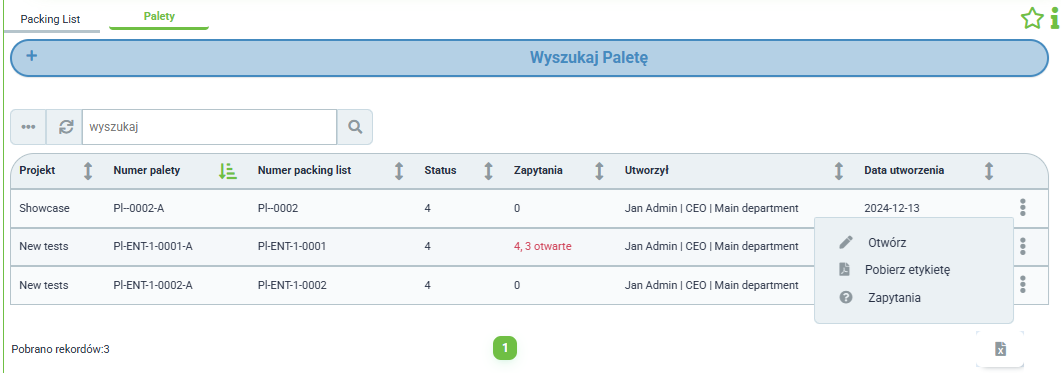
The Pallets tab provides a quick overview of all prepared load units. Each pallet includes key details such as project name, pallet number, associated packing list number, status, creator, and creation date. The intuitive action menu gives you instant access to preview, download labels, or check related requests.
- Central pallet register – all items collected in a single table with sorting and filtering options
- Preview and labels – open pallet details, download a PDF document or label directly from the list
- Quick navigation – text search and dropdown filters help you find the right pallet in seconds
The Pallets tab is your logistics command center – offering full control over each package, enabling quick previews, edits, and generation of documents essential for further transport.

Packing List Editing
Adjust every detail before loading.
The advanced editing view gives you full control over pallet contents before they reach the warehouse floor. You can select specific pipe rows, add location details (building, wing, floor), assign a contact person, and precisely manage the packing order and priority. Technical parameters like pallet height, interlayer weight, or maximum load capacity are just a few clicks away – making every logistic step clear and efficient.
- Quick selection of pipes and rows – focused only on items ready for packing
- Complete location and contact setup – avoid chaos in the final production stage
- Full control over packing parameters – set dimensions and limits with precision
This is more than editing – it’s your command center for packing lists, where every detail matters. The more precise the planning, the smoother the loading.
Pallet Layer Layout
Visual control and technical precision.
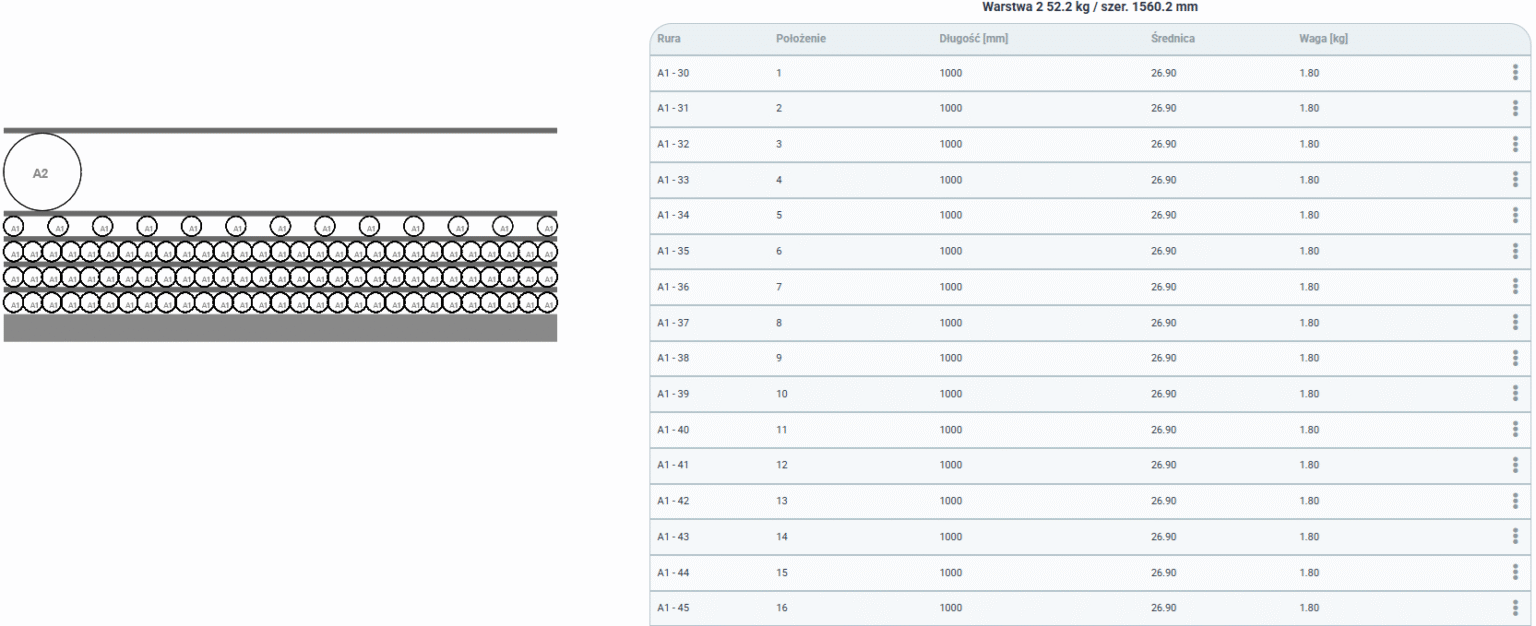
Ensure the exact arrangement of each layer on the pallet – from pipe parameters to packing order. The “Pallets” editing tab gives you a full layer overview, allows adding photo-based layouts, and enables label and PDF documentation generation. All to make loading fast, error-free, and in line with the plan.
You can analyze every layer in detail, seeing the precise composition – lengths, diameters, weights, and pipe positions. This enables accurate load planning and helps avoid mistakes during physical packing. Attached preview images or layout graphics offer a clear visual reference for how each element should be placed – real support for operators and warehouse staff.
Automatic generation of labels and clear PDF documents lets you prepare a complete logistics set in just seconds – for transport, recipients, or internal archiving.
- Full layer specification – length, diameter, weight, and position of each pipe, described layer by layer
- Add technical layout – photo or graphic guide supporting correct element placement
- Label and document generation – automatic export ready for printing and use on the production floor or in the warehouse
This feature eliminates guesswork and chaos during pallet preparation. With a detailed layer breakdown and precise documentation, every packing stage is clear and repeatable. It’s a real time-saver and a quality guarantee for the loading process.

Rafał
Logistics Manager
Who benefits from the Packaging Management module?
- Logistics Specialist
- Packing Supervisor
- Production Coordinator
- Full control over packing lists – quick access to all created lists with information on projects, responsible persons, and completion status.
- Loading optimization – ability to precisely set packing parameters (weight, height, separators) and ensure compliance with transport requirements.
- Automatic labels and documentation – the system generates a full set of shipping materials, including pallet labels and PDF files with layer layouts.
- Clear pallet layer preview – a detailed table showing pipe arrangement, weight, length, and diameter helps onboard workers quickly for the task.
- Layer layout diagrams – technical photos assigned to specific pallets eliminate errors and misunderstandings during element placement.
- Real-time editing – fast updates to packing lists and layer layouts allow for immediate response to changes without needing to contact other departments.
- Verification of pipe compliance with production – the ability to filter and select only those pipes that have actually been produced and are ready for loading.
- Shortage management – the “show unproduced pipes” function allows for quick identification and replenishment of missing items.
- Reporting and oversight – full insight into packing history, assigned personnel, and technical parameters makes process analysis and optimization easier.

Modules tailored to your needs
AdoZet 360 offers the freedom of choice, allowing you to mix and match modules that best meet the needs of your business. This gives you a flexible system fully adapted to the specifics of your operations. At any time, you can expand the structure with new functionalities as your organization grows.